Phantasmal Force – Firmware
Firmware Update Steps
NOTE!
Updating your firmware will likely erase any presets you have saved! Please write down any important setups you would like to keep before updating.
0) Download and unzip the latest firmware from here.
1) Unscrew the four screws on the top of the Phantasmal Force and remove the top cover.
2) Plug your Phantasmal Force into a Mac or PC.
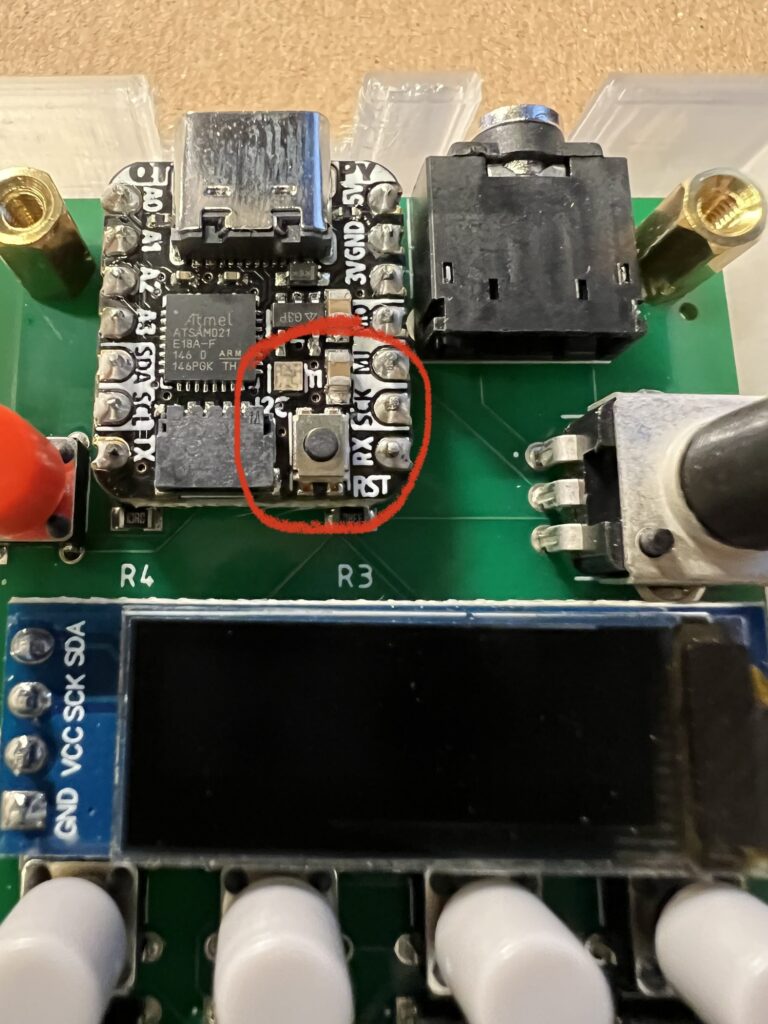
3) Double-click the tiny button on the QTPY microcontroller (shown in the picture below). The little light should turn green.
4) The Phantasmal Force should show up on your Mac or PC as a little hard drive called “QTPY_BOOT”.
5) Drag the firmware file you unzipped (PF_2_6.uf2) into the hard drive called “QTPY_BOOT”.
6) The unit should instantly restart and display the firmware version on the startup screen.
Phantasmal Force Firmware Version 2.6 NOTES:
- CHANGED – Changing CHORD type resets the chord to the default inversion
- CHANGED – Display of note values in CHORD mode was borked (wasn’t including inversion offset)
- CHANGED – Altering a note in CHORD mode automatically changes type to “custom”
- FIXED – Randomizing velocity in either ARP or SEQ modes could remove a note tie
- Download latest Phantasmal Force firmware v2.6